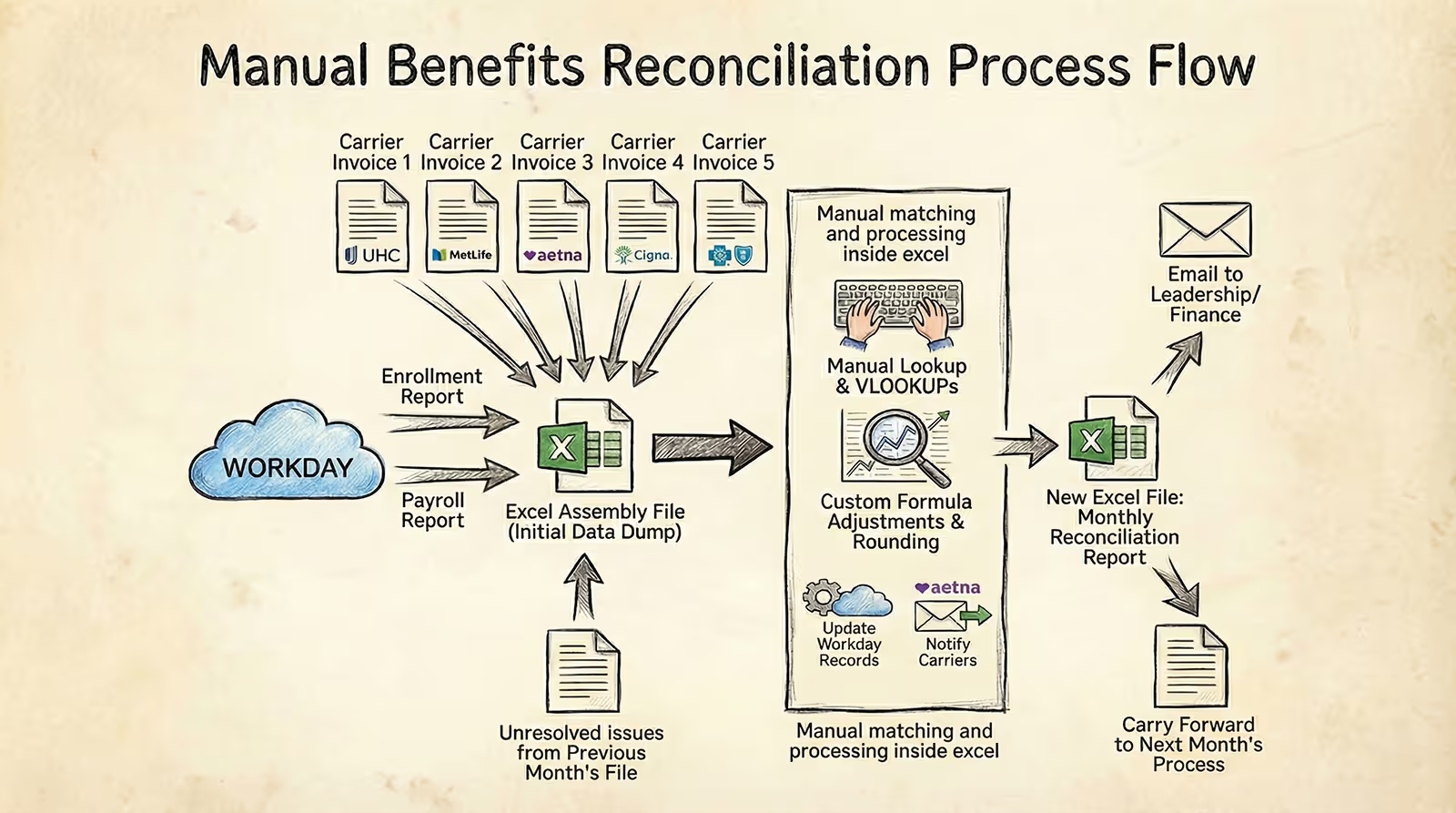
In a Workday environment, enrollment, eligibility, and payroll deductions are managed in a single system of record.
Benefits reconciliation (also referred to as premium reconciliation)—is the process of validating that this Workday data aligns with what insurance carriers actually bill.
[[Tip]][[bold-underline]]At a high level, reconciliation answers three questions:[[/bold-underline]]
- Does the carrier invoice reflect the employees and coverages recorded in Workday?
- Are the rates on the invoice consistent with plan setup and contracts?
- Do payroll deductions and employer contributions in Workday match the billed premiums?[[/Tip]]
This process connects Workday enrollment and payroll data with external carrier invoices. It does not replace Workday. It sits around it.
Why Benefits Reconciliation Remains Necessary After Implementation
Workday implementations are designed to establish accurate data, consistent processes, and reliable data flows to carriers. Even so, carrier billing discrepancies still occur.
Common reasons include:
- Timing differences between Workday updates and carrier systems
- Enrollment changes processed correctly in Workday but delayed downstream
- Rate updates or contract changes not reflected on invoices
- Retroactive adjustments applied after payroll has closed
These issues are not unique to Workday. They exist in any benefits ecosystem with multiple external vendors.
Benefits reconciliation exists to detect these gaps early and document their resolution.
Why Reconciliation Becomes a Client Conversation After Implementation
Reconciliation is not a one-time configuration. It is a recurring operational control.
During implementation, consultants focus on:
- Enrollment setup
- Payroll accuracy
- Data transmission
Carrier invoices typically arrive later. As a result, reconciliation workflows are often defined after go-live—or not at all.
This is when clients begin to surface the same challenges to their consultants:
- Workday serves as the system of record for enrollment and payroll data
- Carrier invoices arrive outside the system
- Reconciliation lives in Excel, where manual data manipulation connects the sources
- Ownership of the process is often unclear
The implementation is successful.
But reconciliation exists outside the system.
This is the post-implementation gap clients raise with their consultants.
A Typical Benefits Reconciliation Case
In many organizations, benefits reconciliation is handled by a single team member.
It is rarely their primary responsibility.
Each month, they must confirm that carrier invoices align with enrollment and payroll data in Workday. The process usually starts from scratch.
The work begins by pulling enrollment and payroll data from Workday. While this may sound straightforward, configuring these reports is not trivial. (A detailed walkthrough of what this step involves is available here)
Once exported, everything moves into Excel. Typically, this means creating:
- One or more tabs for Workday data
- Separate tabs for each carrier invoice
- Additional tabs for rate tables and reference data
Invoice data is copied manually. Plan names and codes rarely match across systems, requiring additional reshaping and mapping.
Employee matching adds another layer of complexity. Carrier invoices often lack a consistent identifier, forcing teams to rely on:
- Names and partial demographic fields
- Helper columns and lookup logic
- Manual review of unmatched records
At the same time, carrier invoices are monthly while payroll deductions may be weekly, bi-weekly, or semi-monthly. Custom formulas are used to spread or accumulate deductions, often introducing rounding errors.
With enough effort, variances are identified.
The next steps are operational:
- Workday records may need to be corrected
- Carriers must be notified and supporting documentation provided
Even then, the work is not finished.
Teams must wait for a future adjustment or corrected invoice and then confirm that the variance has actually been resolved. This requires carrying the issue forward into the next reconciliation cycle and tracking it manually.
At this point, reconciliation becomes an ongoing tracking exercise rather than a one-time comparison—adding more spreadsheets, more notes, and more opportunities for error.
When Excel Reconciliation Works, but Control Is Missing
In Excel-based reconciliation, the challenge is not identifying variances.
It is having confidence in the outcome.
Once the work is done, there is no simple way to verify that the reconciliation was performed consistently or completely. Reviews rely on manual inspection rather than clear confirmation.
Calculation logic is embedded across multiple tabs and formulas. Small changes—copying data, adjusting rates, updating references—can affect results without being obvious. Validating that the logic still behaves as intended becomes increasingly difficult over time.
Control also erodes across reconciliation cycles.
Each month introduces a new version of the file. Context is carried forward manually, often through notes or copied rows. There is no clear checkpoint that confirms the reconciliation was reviewed, approved, and closed.
When ownership changes, understanding past decisions requires walking through the spreadsheet itself. Confidence depends on familiarity with the file rather than on a repeatable process.
The reconciliation may be completed.
But assurance is limited.
This control gap comes up repeatedly in conversations between Workday consultants and their clients.
This is where specialized platforms, such as Tabulera, are used to complement Workday—helping consultants and their clients close the reconciliation gap without changing their core Workday configuration.